Your ability to keep advancing after a battle depends on supply. The Recruitment Camp manages reserve numbers and soldier tiers; the Troops screen assigns those reserves to individual heroes. Completed recruitment alone does not prove the marching team has received its soldiers. Equally, upgrading every reserve can leave soldiers temporarily unavailable when you need immediate reinforcement.
Identify a number shortage or a tier shortage
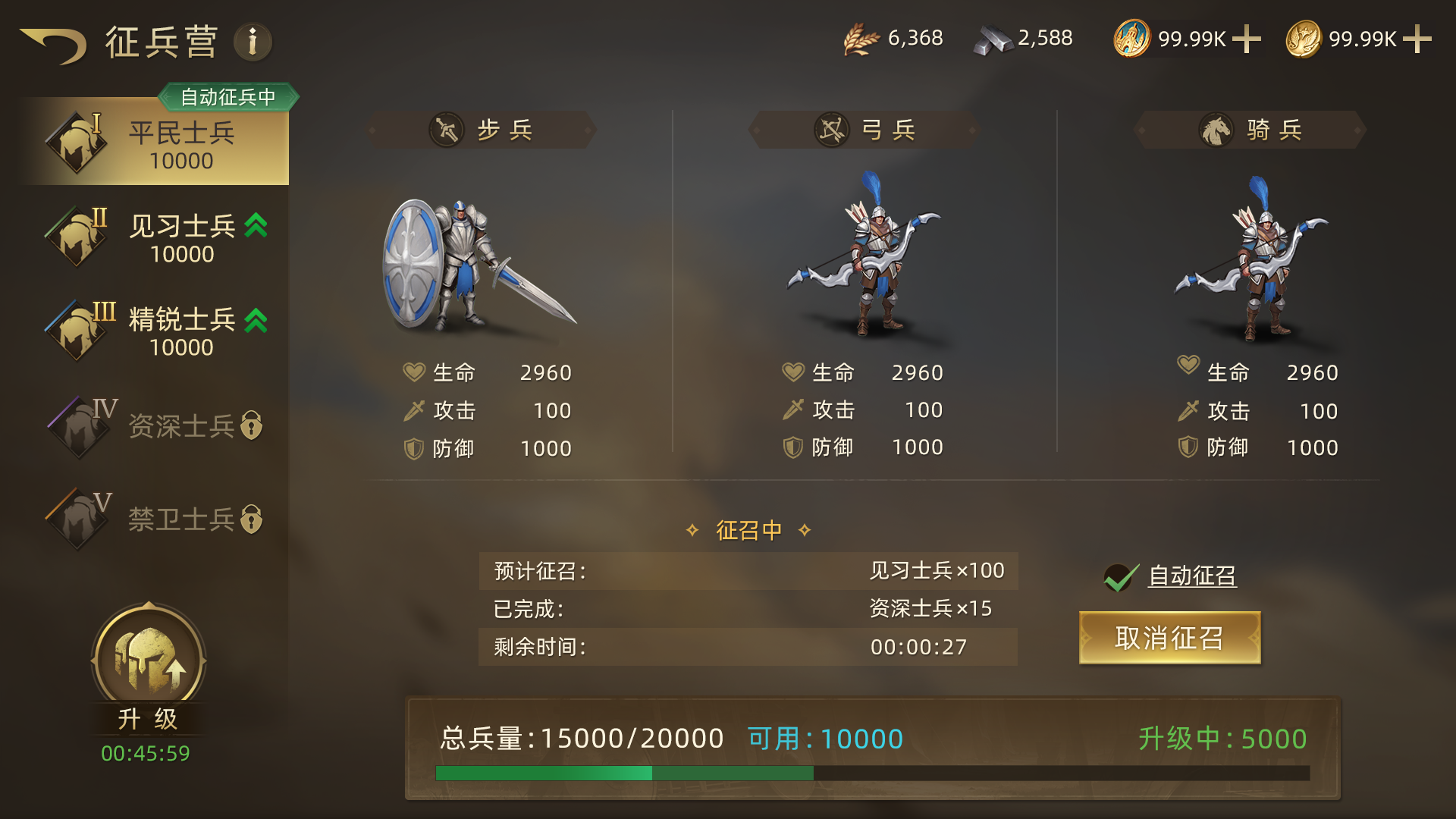
Open the Recruitment Camp in the city and inspect each tier, reserve total, capacity and active queues. There are five soldier tiers, with higher tiers requiring their relevant unlock conditions. You can inspect a locked tier and use its unlock route to find the building requirement rather than repeatedly attempting to recruit it.
| Problem | First action | Check |
|---|---|---|
| A formation lacks soldiers and reserves are insufficient | Recruit an unlocked tier | Resources, remaining capacity and recruitment queue |
| You have low-tier reserves but want a higher tier | Upgrade existing reserves | Unlocked target tier and an available upgrade queue |
| Reserves are sufficient but a team is not full | Review its allocation in Troops | Hero capacity, chosen tier and saved allocation |
Recruit a batch you can use in time
- Choose an unlocked tier, enter or drag the recruitment quantity, and inspect total costs and duration. A slider stopping short of full capacity can mean resources or storage are limiting this batch.
- Confirm and check that the timer starts. Soldiers already completed can be allocated; the entire batch does not have to finish before any reinforcement is useful.
- Enable automatic recruitment when you want continuing supply. Full capacity pauses further production until space becomes available.
- If you need to preserve building resources, inspect both the active batch and automatic recruitment. Disabling automatic recruitment stops future batches; cancelling the already started batch is a separate action with its own refund confirmation.
Do not mistake upgrading soldiers for empty storage
In the upgrade window, select the original tier and a higher unlocked target tier, then check quantity, cost and time before starting. Recruitment and upgrades each have their own queue and can run together. A working upgrade queue cannot simultaneously start a second batch with a different target.
Soldiers being upgraded still use reserve capacity. Their temporary unavailability does not create storage space. For example, a capacity of 20 with 10 reserves still has 10 spaces after those soldiers enter an upgrade, not 20. If Available is lower than the reserve total, check how many soldiers are upgrading instead of spending again to locate supposedly missing stock.
Put completed reserves into the marching team
Return to Troops, choose the formation, check each hero’s actual tier and numbers, and confirm allocation. A newly enlarged high-tier reserve does not automatically mean every formation has switched to that tier. Recheck your main low-tier team, especially after commander or roster changes.
For sustained fighting, keep immediately needed reinforcement available while using the other queue to upgrade surplus lower tiers gradually. Eligible field redeployment points also support recruitment, but impose extra resource costs and local queue restrictions. Before rushing out for another field, compare the reinforcement bill with that objective’s value rather than exhausting resources needed for the next construction and recruitment cycle.